
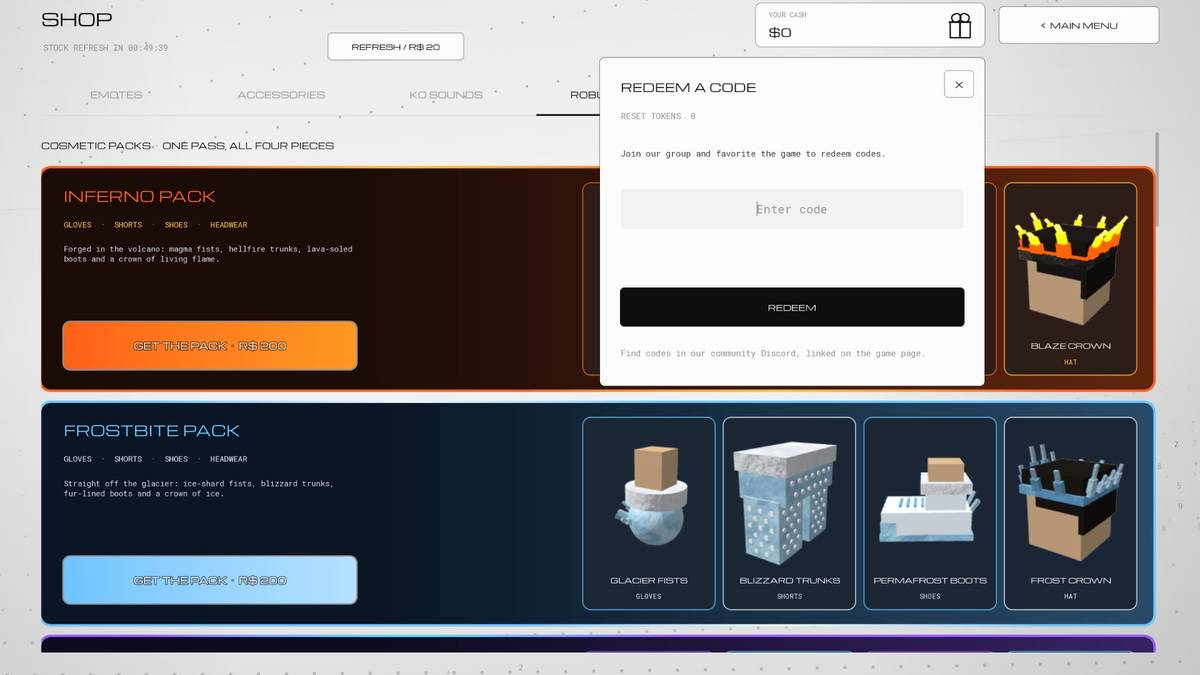
The two gates before the code field
The dialog asks for two things that have nothing to do with the code itself.
Join the Studio Wire group on Roblox. The studio is the maker of the game, and the dialog names the membership as a condition rather than a suggestion.
Favourite the game on its Roblox page. This is the second half of the same sentence.
Both are free and take under a minute. If you skip either one, the redemption is refused in a way that reads like a broken code, so clear both before you start swapping strings.
The five steps in order
- Join the Studio Wire group.
- Favourite the game.
- Open the shop and click the gift icon in the top right, beside Main Menu.
- Paste a code from the current code list into the Enter code field.
- Press REDEEM, then check for the reward the code names rather than one fixed number.
This site has not redeemed a code inside the game. The dialog wording and the button positions come from a screenshot taken on 1 November 2026, so check that the screen still matches before you assume a step has moved.
The RESET TOKENS counter sits above the input field and starts at zero on a fresh account, which makes it a useful tell for the two milestone codes: both hand over a Reset Token, so that number should move. UPDATE2 pays Cash and a crate instead, so check your Cash balance for that one. If nothing changes anywhere and no message appears, the redemption did not happen.
What each failure actually means
| What you see | What happened | What to do |
|---|---|---|
| Nothing happens after REDEEM | The string is incomplete or has a stray space | Paste the string instead of retyping it |
| The code is refused with no reason | The group or the favourite is missing | Do both, then reopen the dialog |
| An expired message | The code is dead | Move to a code the game page still lists |
| An already redeemed message | That account used this string before | Nothing to fix, use a different code |
The developer has not published anything about letter case. Every code on the game page is written in capitals, so type capitals and do not experiment.
Desktop and mobile are not the same
The dialog in the screenshot is the desktop layout: gift icon top right, Main Menu beside it, a text field and one red button.
On a phone the same screen reflows, and the two things that go wrong are typing and scrolling. Since the code strings mix letters and digits, use the copy button and paste rather than tapping the string out. If the field does not appear, the gate is the same on both platforms: group membership and the favourite.
Where the codes come from
The dialog footer points at the community Discord, and the game page description carries the same list in plain text. Those are the two channels the studio controls. Everything else, including the many lists that rank for the same search, is a third party copying one of those two.
The Discord is Studio Wire's own server, so the invite on the game page is the one to trust. Search results also carry a separate game called Ragdoll Robot Boxing with its own codes, which is why a string can look familiar and still fail here.
After the reward lands
A Reset Token is worth R$50 in the shop and it permanently resets a character slot, so it is the wrong tool when what you want is a different build with the same record. The comparison between a Reset Token and a Build Edit is on what the rewards are worth, and the build itself is covered by Ragdoll Boxing builds.
If you have the listed codes in hand, use them in one sitting. Codes have stopped working within a day of release before, and the like-count milestone on the game page means a new string can arrive while an old one is still unclaimed.